VeriGuard AI · RightPick Technology Limited

Empowering Seniors with Universal AI Fact-Checking

One tap to verify. Share suspicious posts from WhatsApp, Douyin, or any app—get clear, trustworthy answers in seconds.

How to use VeriGuard AI 如何使用 VeriGuard AI

Simple steps for seniors: @mention the bot where you already chat.

長輩可直接在熟悉的社群平台標註 @VeriSenior,即時取得查證結果。

WhatsApp

Open the chat, type @VeriGuard and send the message you want checked. 在聊天室輸入 @VeriGuard 並送出想查證的訊息。

Douyin / 抖音

In comments or DM, @ mention VeriGuard AI and paste the claim for instant verification. 在留言或私訊標註後貼上內容即可快速查證。

Works in the apps you already use—no new app to install.

Knowledge Base preview 查核知識庫預覽

See how VeriGuard AI labels claims—Fake vs True—with clear explanations.

透過「真實 / 不實 / 注意」標示,協助長輩快速理解訊息可信度。

Fake 不實

Drink lemon juice and baking soda to cure cancer in 2 weeks.

False. No single home remedy cures cancer. Always follow your doctor’s plan.

Forward this to 10 people or you will have bad luck.

Hoax. Chain messages have no power over your life or device.

True 真實

WHO recommends handwashing with soap to reduce infection spread.

Correct. Supported by WHO and national health authorities.

Your bank will never ask for your PIN or password by SMS or phone.

Correct. Legitimate banks do not request sensitive details this way.

Interface Preview 介面預覽

Real product interface samples with consistent visual language and senior-friendly readability.

以下為介面示意圖,呈現首頁、查核庫、社群整合與互動教學流程。

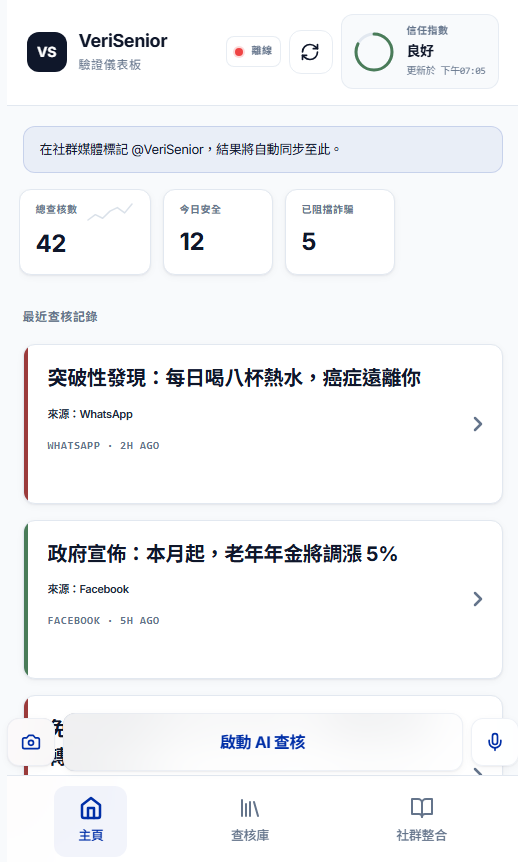
Home Dashboard / 首頁儀表板

Home Dashboard / 首頁儀表板

Recent checks, trust score, and quick AI verify button designed for seniors.
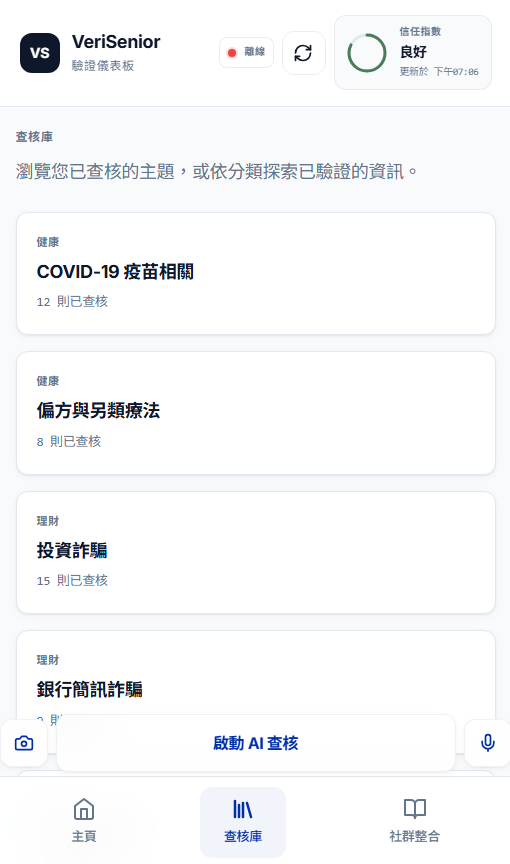
Knowledge Library / 查核庫

Knowledge Library / 查核庫

Topic-based browsing for verified claims in Health, Finance, and Social News.
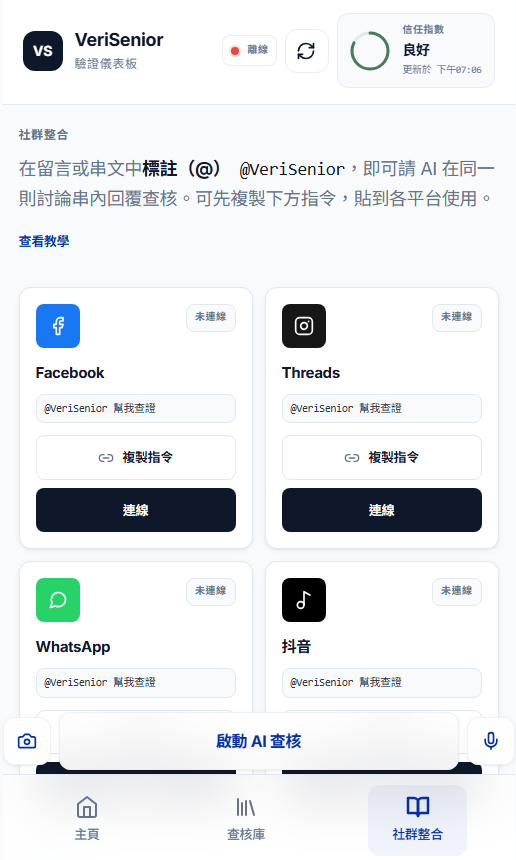
Social Integration / 社群整合

Social Integration / 社群整合

Cross-platform cards for Facebook, Threads, WhatsApp, and Douyin mention flows.
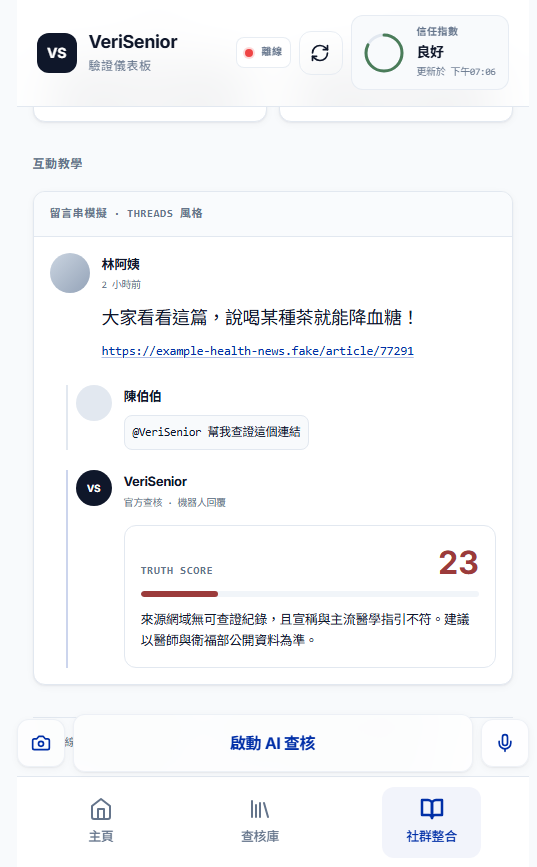
Interactive Demo / 互動教學

Interactive Demo / 互動教學

Step-by-step mention example with AI response in Traditional Chinese.

VeriSenior AI FastCheck App 產品介紹

VeriSenior is a fact-checking assistant designed for seniors. It helps users quickly verify suspicious social posts, links, and claims with simple Traditional Chinese explanations.

VeriSenior 是專為長者設計的查證助手,以清楚易懂的繁體中文提供解釋與建議。

What This App Does 這個 App 做什麼

  • Provides a mobile-friendly dashboard for recent verification records. 提供手機友善的近期查核儀表板。
  • Supports quick verification entry from social context (especially Threads). 支援從社群情境快速發起查證(特別是 Threads)。
  • Uses AI analysis (or mock logic in demo mode) to classify content as True (真實), False (不實), or Caution (注意).
  • Shows readable explanations, confidence, and source links. 提供易讀解釋、信心分數與來源連結。

Core User Flow 核心流程

  1. 1User submits content (social mention, pasted link, photo, or voice input). 使用者送出內容(標註、連結、圖片或語音)。
  2. 2System fetches or extracts source content. 系統擷取與解析來源內容。
  3. 3AI (or mock analyzer) evaluates claim reliability. AI(或展示模式分析器)評估可信度。
  4. 4Result appears in the dashboard and detail page. 查核結果顯示於儀表板與詳情頁。
  5. 5User can review explanation and open original source. 使用者可閱讀說明並開啟原始來源。

Key Features 核心功能

Built for high trust, senior accessibility, and cross-platform social verification.

以高可信度、長輩友善與跨平台社群整合為核心設計。

1) Verification Dashboard 驗證儀表板

  • Clean list of recent checks with status color accents. 近期查核列表清楚顯示狀態顏色。
  • Pull-to-refresh and manual refresh support. 支援下拉與手動更新。
  • Processing and error states for transparency. 提供處理中與錯誤狀態提示。

2) Result Detail View 查核詳情

  • Full explanation in Traditional Chinese. 以繁體中文完整解釋查核結果。
  • Optional image preview with graceful fallback. 支援圖片預覽與失敗備援。
  • Source URL button to open original post. 可一鍵開啟原文來源連結。
  • Voice playback for accessibility. 提供語音播放提升無障礙體驗。

3) Threads Link Deep-Link Verification 深連結查證

  • Detects Threads post URLs from clipboard or pasted input. 自動偵測剪貼簿或貼上的 Threads 連結。
  • Parses post IDs and starts verification directly. 解析貼文 ID 後直接啟動查證。
  • Creates a processing card immediately, then fills final result. 先建立處理中卡片,再更新最終結果。

4) Social Sync (Webhook Pipeline) 社群同步

  • Backend supports webhook-style ingestion for social mentions. 後端支援 webhook 方式接收社群標註。
  • Mention pattern like @VeriSenior 幫我查證 can trigger analysis flow.
  • Results are persisted and returned by /api/verifications. 結果可持久化並由 /api/verifications 提供。

5) AI + Fallback Modes AI 與備援模式

  • AI provider support (OpenAI / Gemini) via backend environment variables. 可透過環境變數接入 OpenAI / Gemini。
  • If no AI keys are configured, mock heuristic analysis is used. 未設定金鑰時自動切換模擬分析。
  • GitHub Pages/demo mode can run in mock mode without backend. 在 GitHub Pages 展示模式可無後端運行。

6) PWA & Mobile Experience 行動體驗

  • Installable Progressive Web App (PWA) behavior. 支援可安裝的 PWA 體驗。
  • Responsive UI optimized for phone usage. 響應式介面針對手機優化。
  • Offline/service-worker support for static assets. 靜態資源具備離線與 service worker 支援。

Tech Stack (Current) 目前技術架構

Frontend 前端

React + Vite + TypeScript + React Router

UI 介面

Tailwind-style utility classes + Lucide icons

Backend 後端

Node.js + Express + TypeScript

Deployment 部署

Frontend: GitHub Pages / Backend: HTTPS Node host

Deployment Note 部署說明

GitHub Pages serves only static files, so real-time API/webhook features require a separate backend deployment. Without backend, the app can still run in mock/demo mode for UI and flow testing.